
By Joseph Reed October 9, 2026
Split tender POS setup allows merchants to accept cash, credit cards, debit cards, and gift cards within one sale. To configure it correctly, enable multiple tenders, support eligible partial authorizations, display the remaining balance automatically, and link refunds to the original payments. Accurate setup keeps card settlement, cash drawers, and gift card records reconciled separately.
A customer walks into a retail store with a $40 gift card, $30 in cash, and a credit card. Their purchase totals $150. Instead of running separate sales, the cashier should be able to combine all three payment methods into one completed transaction.
That sounds simple until something goes wrong. What if the gift card covers only part of the balance? What happens when the credit card declines after cash has already been accepted? And if the customer returns a $60 item, which payment method should receive the refund?
These situations are exactly why a reliable split tender POS setup matters. The register needs to manage more than payment collection. It must preserve each tender amount, track incomplete transactions, calculate refunds, and produce reports that match the actual movement of money.
This guide explains how to configure split payments, enable partial authorization, manage multi-tender refunds, and prevent the cashier errors that create end-of-day discrepancies.
What Is Split Tender at the POS, and How Does It Work?
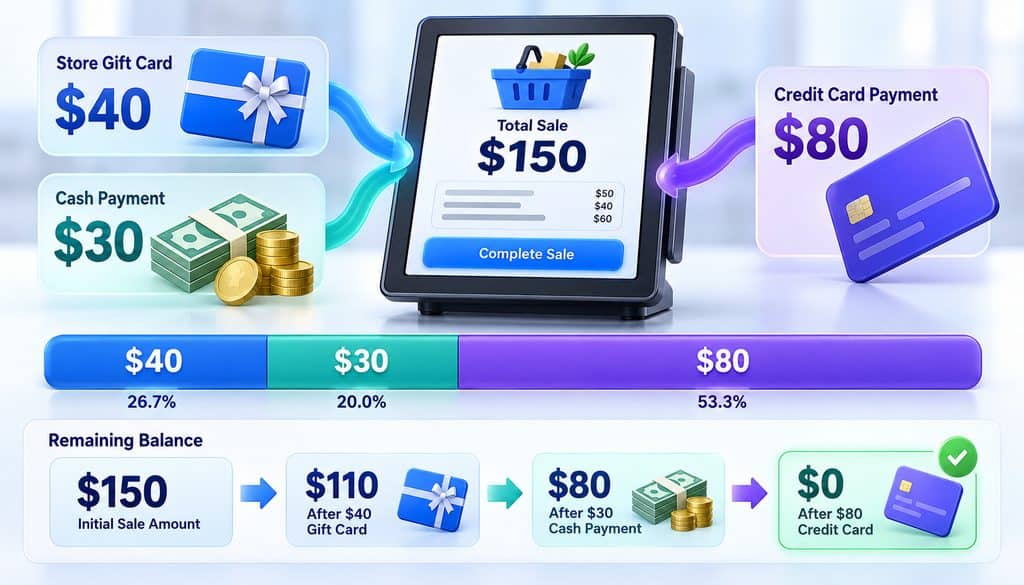
Split tender means using two or more payment methods to complete one purchase. Rather than treating each payment as a separate sale, the POS records multiple payments against a single transaction total.
For example, suppose a customer buys $150 worth of merchandise and chooses three different payment methods.
| Payment method | Amount | Payment destination |
| Store gift card | $40 | Gift card ledger |
| Cash | $30 | Cash drawer |
| Credit card | $80 | Card processor |
| Total sale | $150 | One completed sale |
After the gift card redemption, the POS should show $110 remaining. Once the customer provides $30 in cash, the balance should drop to $80. The credit card terminal then charges $80 to complete the transaction.
The customer receives one receipt showing the entire purchase and its individual payment methods.
From an accounting perspective, however, the money follows three separate paths. Card payments enter card processing, cash remains in the register, and merchant-issued gift card redemptions reduce the stored-value balance.
That separation is the foundation of accurate split payment reporting.
Split Tender vs. Partial Payments vs. Split Checks
These terms are sometimes used interchangeably, but they describe different functions.
| Payment feature | Meaning | Typical example |
| Split tender | Several payment methods fund one sale | $50 cash plus $100 card |
| Partial payment | Less than the full amount is collected initially | $200 deposit on an order |
| Partial authorization | Issuer approves less than the requested card amount | $25 approved on an $80 purchase |
| Split check | An order is divided into separate bills | Two customers paying restaurant checks |
| Layaway | Payments are collected before goods are released | Three installments for reserved merchandise |
A restaurant can split one check into separate bills and then accept multiple tenders on each bill. Those are two different operations.
Similarly, a payment deposit is not necessarily a completed retail sale. It may need to remain attached to an open order until the merchant delivers the goods or services.
Split Tender POS Setup: How to Configure Multiple Payment Methods
A successful split tender POS setup starts with confirming the capabilities of the POS, terminal, gateway, and merchant account.
Some systems include mixed-payment functionality by default. Others require a configuration change, software feature, compatible integration, or provider activation.
Follow these steps before employees begin accepting multiple payment methods on one sale.
Step 1: Enable the Payment Types Your Business Accepts
Open the POS administration dashboard and locate the payment settings.
The menu might appear as Payment Methods, Tender Settings, Checkout Configuration, or Split Payments.
Activate the relevant tender categories:
- Cash payments
- Credit and debit cards
- Merchant-issued gift cards
- Supported prepaid cards
- Other approved payment methods
Gift card functionality deserves particular attention. A store-issued gift card may require a separate integration that manages stored balances, redemptions, and refund restorations.
Network-branded prepaid cards usually run through the card-processing system instead of the merchant’s internal gift card ledger.
Before upgrading or installing new hardware, review the credit card terminal setup process to understand the basic installation, integration, and testing requirements.
Step 2: Choose a Practical Tender Order
Tender order describes the sequence in which customers provide their payment methods.
For a split payment between card and cash, collecting cash first often makes checkout easier. The register calculates the remaining balance before sending the card authorization request.
For a gift card plus credit card payment, redeeming the merchant-issued gift card first is often convenient because the POS can automatically apply its available value.
A common workflow is:
- Scan all merchandise and calculate the final amount.
- Confirm discounts and applicable taxes.
- Ask the customer how they want to divide the payment.
- Apply the gift card or cash contribution.
- Display the remaining balance.
- Process the final card payment.
- Complete the sale only after the balance reaches zero.
Tender order is a workflow decision, not a universal card-network requirement.
A merchant should select the sequence that its equipment supports reliably while still accommodating customer preferences.
Step 3: Enable Partial Payment POS Configuration
A register that accepts only the full transaction amount cannot properly handle several payment methods on one sale.
Look for an option that allows employees to enter a tender amount below the total due.
For example, a customer owes $125 and wants to pay $45 cash and $80 by card.
The POS should let the cashier enter $45 as the cash contribution and automatically request $80 from the card terminal.
It should also prevent the cashier from accidentally marking the sale as paid after collecting only $45.
The most useful partial payment POS configuration settings include:
- Manual entry of individual tender amounts
- Automatic remaining-balance calculation
- Multiple payment entries under one sale ID
- Clear approval and decline messages
- Incomplete-sale safeguards
- Proper cancellation and reversal controls
The cashier should not need to perform mental arithmetic or enter negative adjustments to make the sale balance.
Step 4: Enable Partial Authorization for Supported Cards
Partial authorization becomes especially valuable when customers use prepaid cards with limited funds.
Suppose a customer owes $90 but their prepaid card has only $35 available.
Without suitable partial authorization handling, an attempt to charge the full $90 may be declined.
When supported, the issuer can approve $35, leaving $55 for another payment method.
Visa’s Partial Authorization Service documentation explains how merchants can accept the approved portion and collect the remaining amount using another tender.
Before enabling this functionality, confirm the following with your payment provider:
- Does the merchant account support partial approvals?
- Can the gateway and terminal identify a partial authorization?
- Does the POS automatically recognize the approved amount?
- Can the customer complete the remaining balance with another tender?
- Can the merchant reverse an incomplete transaction correctly?
Partial authorization is not universally available across all card products and integrations. The processor’s capabilities and the payment flow determine how it must be configured.
Step 5: Configure Remaining-Balance Prompts
Every successful payment should immediately update the outstanding balance.
Consider a $140 purchase:
| Checkout stage | Payment applied | Remaining balance |
| Original purchase | — | $140 |
| Gift card redeemed | $40 | $100 |
| Cash accepted | $30 | $70 |
| Credit card approved | $70 | $0 |
The cashier should clearly see how much remains after every accepted payment.
A good POS also prevents a second payment request from exceeding the outstanding balance unless the supported cash-tender workflow separately accounts for physical cash received and change.
If the card terminal loses connectivity during checkout, the employee should inspect the payment status before attempting another authorization.
Submitting the same payment twice without checking may create duplicate authorizations or charges.
Step 6: Configure Refund Permissions and Transaction Controls
Split tender refunds require access to the original payment records.
The POS should ideally preserve:
- Original sale ID
- Transaction date and time
- Each tender type and amount
- Card payment references
- Gift card redemption details
- Any void, reversal, or refund action
- Employee and manager identifiers
Routine refunds can be assigned to authorized staff, while unusual refund destinations or manual adjustments may require supervisor approval.
For example, a cashier should not have unrestricted authority to refund a card-funded purchase through the cash drawer.
Role-based permissions and audit trails help businesses distinguish genuine mistakes from unauthorized activity.
The detailed controls discussed in POS cashier permissions, voids, and no-sale alerts are particularly relevant when employees can reverse or modify completed transactions.
Step 7: Test Every Common Payment Combination
Before launching split tender, test the following transactions:
| Test transaction | Expected result |
| Cash plus card | One sale, two correctly recorded tenders |
| Gift card plus credit card | Gift balance reduced; remaining amount charged |
| Two credit cards | Both card transactions recorded separately |
| Partial prepaid approval | Approved amount recorded and remainder requested |
| Card decline after cash | Cash tender retained correctly while sale remains incomplete |
| Sale cancellation | Each completed or approved payment handled through the appropriate reversal process |
| Partial return | Refund routed using the original payment records |
| End-of-day close | Each tender type reconciles separately |
Run these tests using the POS provider’s approved testing procedures.
The system is ready only when checkout, refunds, cancellations, and settlement reporting all behave correctly.
How Split Tender Works at Settlement: Cards, Cash, and Gift Cards
One of the biggest misconceptions about multiple payment methods one sale is that every payment enters the same merchant settlement batch.
It does not.
A split-tender sale combines payments for checkout purposes while maintaining separate financial records for each tender type.
Consider a $200 sale funded by $100 in credit card payments, $40 in cash, and $60 through a merchant-issued gift card.
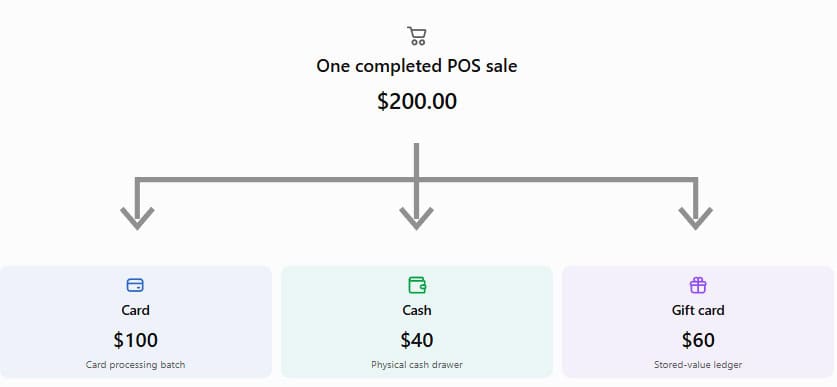
Split tender POS settlement showing how card, cash, and gift card payments are recorded separately
Image alt text: Split tender POS settlement illustrating separate card-processing, cash-drawer, and store gift card accounting records.
Card Payments Enter Card Processing
The $100 credit card component is processed through the appropriate card authorization and settlement flow.
It may enter a card batch or other processor-supported settlement process.
The full $200 purchase should not be treated as a $200 card transaction merely because a card was one of the payment methods.
The amount ultimately deposited into the business bank account may also differ from the gross card settlement amount because of refunds, processing fees, and funding arrangements.
Cash Payments Remain in the Drawer
The $40 cash contribution is recorded as cash tender.
It increases the net physical cash held by the register, after accounting for any change issued.
That money is not part of card settlement.
During closing, the cashier should reconcile actual drawer contents against the POS’s expected cash balance, adjusted for opening cash, payouts, deposits, and other recorded movements.
Store Gift Cards Affect the Stored-Value Ledger
The $60 merchant-issued gift card redemption reduces the customer’s available gift card balance.
For a conventional prepaid store gift card, the redemption generally reduces the merchant’s outstanding gift card liability rather than generating a new card-network deposit.
This is different from a Visa- or Mastercard-branded prepaid gift card, which generally uses its relevant payment network.
The POS should distinguish these products so accounting reports do not combine unrelated payment types.
Why Sales Totals and Processor Deposits Differ
Suppose a retailer completes $5,000 in sales, including $3,500 card payments, $1,000 cash, and $500 store gift card redemptions.
The merchant’s card-processing settlement relates to the $3,500 card portion, not the full $5,000 sales figure.
Cash and store gift card redemptions must be reconciled through their own records.
The processor may also deduct fees, offset refunds, or fund batches on a different day.
Comparing total POS sales directly with a single bank deposit can therefore create a false impression that money is missing.
Why Partial Authorization Matters for Prepaid and Gift Card Payments
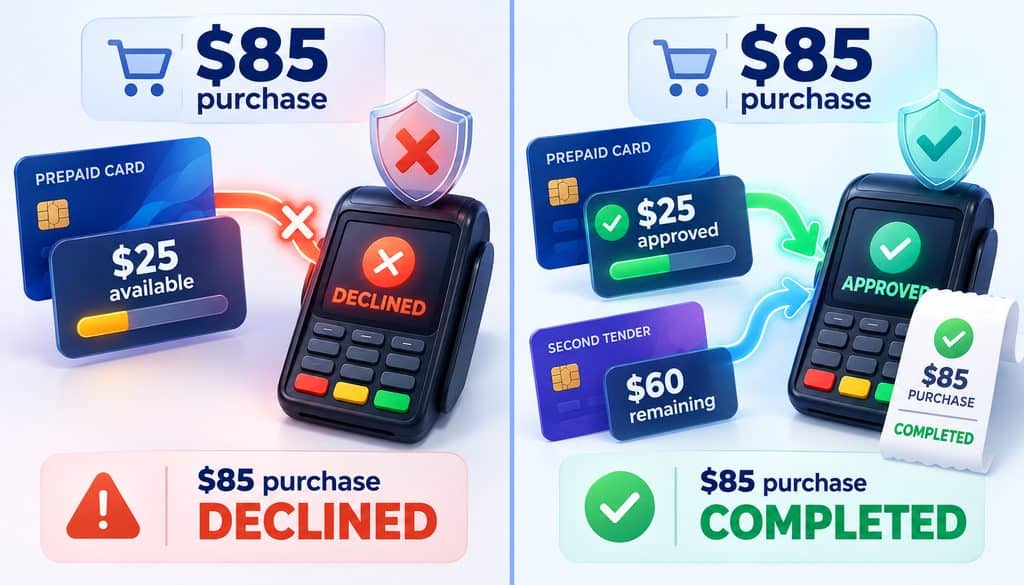
Partial authorization is different from a customer intentionally requesting a smaller card charge.
With a manual split payment, the customer chooses the amount for each tender.
With partial authorization, the issuer approves less than the requested amount.
For example:
- Purchase total: $85
- Available prepaid card balance: $25
- Issuer-approved amount: $25
- Remaining payment required: $60
The POS must recognize the $25 approval and offer a way to collect the additional $60.
Visa’s official guidance specifically addresses the need to subtract the partially approved amount from the purchase total and request another form of payment.
What Happens When Partial Authorization Is Disabled?
The customer may receive a decline even though the prepaid card contains enough funds to cover part of the purchase.
The cashier may incorrectly assume the card has no available money.
Some employees might attempt repeated authorizations for guessed amounts, creating confusion and unnecessary transaction attempts.
The better approach is to support the approved partial-authorization workflow whenever the relevant equipment, processor, and card program allow it.
What If the Customer Cannot Pay the Remaining Balance?
The merchant must not close the sale as fully paid.
Instead, the cashier should follow the POS and processor’s supported cancellation or reversal process.
An approved authorization is not the same thing as a completed capture or settled payment.
This distinction matters because abandoned approvals may temporarily affect customers’ available funds.
Visa Acceptance Solutions’ partial authorization documentation also describes integration-specific options for handling an insufficient approved amount.
Split Tender Refund Handling: Which Payment Method Gets Refunded First?
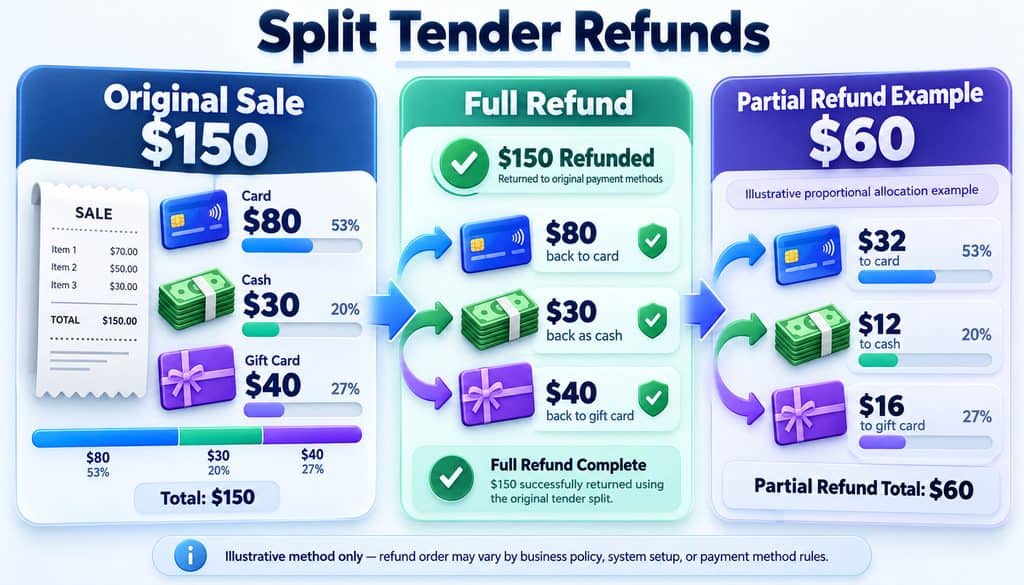
There is no universal rule requiring every split-tender refund to go to cash, gift card, or credit card first. Refunds should follow the original payment records, applicable network requirements, processor rules, merchant policy, and applicable law.
The most important principle is that a card refund should ordinarily be credited back through the eligible original card account.
This prevents employees from improvising refund destinations and creating records that do not match the original payments.
Mastercard’s published Transaction Processing Rules describe requirements for refund transactions, including the relationship between the original purchase and the refund and restrictions on refund amounts.
Full Refund Example: Three Payment Methods
Suppose the customer made a $150 purchase using:
| Original tender | Payment amount | Example full refund |
| Credit card | $80 | $80 credited to original card |
| Cash | $30 | $30 returned in cash |
| Store gift card | $40 | $40 restored to eligible gift card |
| Total | $150 | $150 refunded |
This is a straightforward full-refund arrangement when permitted by the processor, card network, gift card program, and applicable return policy.
Some gift card programs may issue replacement stored value rather than restoring the original physical gift card.
The important control is to preserve the relationship between the original payments and the refunds.
Partial Return Example: Customer Returns a $60 Item
Now imagine the customer returns only one item worth $60 from the original $150 purchase.
The POS must calculate the refund amount and determine which tender or combination of tenders can receive it.
Different systems may support different allocation models.
| Refund approach | Illustrative $60 allocation | Consideration |
| Proportional allocation | $32 card, $12 cash, $16 gift card | Follows original tender percentages |
| Card-first allocation | $60 to original card | Within the original $80 card amount |
| Gift-card-first allocation | $40 gift card, $20 card | Requires suitable policy and processing support |
These examples illustrate possible accounting allocations, not universally permitted refund options.
The approved refund path depends on the system’s functionality, the original payment methods, and the applicable rules.
Merchants should not configure unrestricted cash refunds for card-funded sales or assume that any allocation is acceptable merely because the amounts add up.
A Reliable Split Tender Refund Workflow
Follow this sequence:
- Find the original sale. Retrieve the purchase using the receipt or transaction history.
- Identify returned merchandise. Determine which items and quantities are being returned.
- Calculate the refundable amount. Account for applicable tax, discounts, and other adjustments.
- Review the tender history. Check how much was paid using cash, cards, and gift cards.
- Apply the approved refund policy. Follow processor and network requirements.
- Process linked refunds. Use original payment references wherever supported.
- Verify the final totals. Ensure the customer does not receive duplicate or excessive refunds.
- Issue a refund receipt. Show each refund amount and destination.
A linked refund makes future reconciliation easier and gives staff a transaction history to review if the customer raises a question.
What Happens If the Original Gift Card Is Missing?
A customer may have discarded the original store gift card before returning merchandise.
Where the gift card program permits it, the merchant may be able to restore the balance to an account or issue replacement stored value.
Employees should use the approved POS workflow instead of manually creating untracked gift card balances.
A network-branded prepaid card has different refund requirements and should not automatically be treated as a merchant-issued store gift card.
Why Refunding the Wrong Tender Creates Problems
Incorrect refund allocation can create several issues:
- Cash drawer shortages
- Gift card liability discrepancies
- Refunds that cannot be connected to the original sale
- Duplicate refunds
- Customer disputes
- Card-network or processor compliance problems
For merchants processing frequent returns, split tender refund handling should be included in cashier training and manager exception reviews.
How Split-Tender Receipts and End-of-Day Reports Should Look
A properly configured POS should produce one sales receipt with a clear payment breakdown.
The receipt should show the full transaction amount and the portion paid by each method.
For a $120 sale, a simple receipt might look like this:
| Receipt detail | Amount |
| Merchandise and applicable tax | $120.00 |
| Total sale | $120.00 |
| Gift card payment | $35.00 |
| Cash payment | $20.00 |
| Credit card ending 1234 | $65.00 |
| Balance due | $0.00 |
Illustrative receipt using fictional payment information.
The actual receipt format depends on the POS and payment terminal.
Some integrated systems can show every payment on one receipt. Other systems may print separate card slips while maintaining a combined sales receipt.
How Multiple Tenders Appear in Daily Reports
Consider three transactions during one shift:
| Sale | Cash | Credit card | Store gift card | Total |
| Transaction A | $30 | $70 | $0 | $100 |
| Transaction B | $0 | $40 | $20 | $60 |
| Transaction C | $50 | $0 | $25 | $75 |
| Total | $80 | $110 | $45 | $235 |
The POS should recognize $235 in completed sales while also identifying $80 cash, $110 card, and $45 store gift card tenders.
Only the card-funded portion is included in the relevant card-processing settlement.
This separation prevents sales reports from being confused with bank funding reports.
How Tips and Adjustments Affect Reports
Restaurants and service businesses may also collect tips on split-tender transactions.
The POS should distinguish merchandise or service revenue from customer tips and their payment methods.
Tip-adjustment rules, payroll reporting, and closing procedures can create additional reconciliation requirements.
The process becomes easier when tip records are connected to the correct employee and transaction, as explained in POS tip reporting and payroll-ready data.
Three Cashier Mistakes That Cause Drawer Shortages
Split-tender discrepancies do not always involve missing money. They often result from incorrect tender entries or misunderstood register workflows.
Mistake 1: Recording the Full Sale as Cash
A customer makes a $100 purchase and pays $20 cash plus $80 by card.
The cashier accidentally records $100 as cash while processing the $80 card payment separately.
The drawer may appear $80 short because the POS expects more physical cash than was actually collected.
How to prevent it: Require employees to enter the real cash contribution and verify the remaining balance before processing the next tender.
Mistake 2: Confusing Cash Received With Cash Applied
A customer owes $45 and wants to use $20 cash plus $25 card.
They hand the cashier a $50 bill.
The correct net cash contribution is $20, so the customer should receive $30 change, assuming the POS supports this cash-handling workflow.
If the cashier records the wrong amount received or fails to record the change, drawer totals may become inaccurate.
How to prevent it: Train employees to distinguish physical cash received, cash applied to the purchase, and change returned.
Mistake 3: Canceling a Sale Without Handling Existing Payments
A customer redeems a $30 gift card and then attempts to pay the remaining amount with a credit card.
The card transaction fails, and the cashier cancels the order.
If the POS does not properly reverse the gift card redemption, the customer’s stored balance may remain reduced even though the purchase was not completed.
How to prevent it: Require employees to inspect all completed or approved payment entries before canceling or restarting a transaction.
These operational controls should be considered when choosing a credit card terminal, especially when the terminal must integrate with a separate POS application.
Handling Two Credit Cards, Deposits, and Layaway Payments
Not every mixed-payment transaction follows the typical cash-plus-card pattern.
Businesses should test several edge cases before relying on split tender for more complicated orders.
Splitting a Purchase Across Two Credit Cards
A customer wants to divide a $200 purchase between two credit cards.
They request $120 on the first card and $80 on the second.
The POS should process two separate card payments while preserving one underlying sale.
If the second card declines, the register must retain the accurate unpaid balance.
If the customer cancels the purchase, the merchant should follow the correct procedure for reversing or refunding any earlier approved or completed card transaction.
The system must not assume that approval on the first card means the entire sale has been paid.
Deposits Plus Final Balance Payments
Businesses often collect deposits for custom products, event reservations, or future services.
For example:
| Order detail | Amount |
| Total order | $1,000 |
| Initial deposit | $250 |
| Remaining balance | $750 |
A deposit is typically better handled through the POS’s supported order, invoice, or deposit-payment workflow instead of leaving a standard retail checkout open for an extended period.
The system should preserve the payment history and show how much remains due.
Revenue recognition, refunds, and tax treatment may depend on the nature of the transaction and applicable rules.
Layaway-Style Payments
Layaway arrangements allow customers to pay for merchandise over time before receiving it.
For a $300 order, a customer might pay three installments of $100.
The POS needs to track the order status, cumulative payments, outstanding amount, refund conditions, and merchandise release.
A basic split-tender feature does not necessarily provide these capabilities.
Choose a layaway or order-management feature when payments will occur across multiple days or visits.
Split Tender With Discounts, Tips, and Surcharges
Additional checkout adjustments can complicate payment allocation.
A percentage discount may affect the final sale total before the customer divides the payment.
Tips may need to be associated with particular transactions and employees.
Payment-method-specific surcharges require careful treatment under applicable state law and card-network rules.
Do not assume that a surcharge can be calculated against the whole purchase when only part of the transaction is card-funded.
The POS provider and processor should confirm the supported calculation method before those settings are activated.
Cashier Training Checklist for Split Tender POS Setup
Cashiers should be able to complete a mixed-payment sale without manually recalculating totals or guessing which tender received a refund.
Training should cover payment entry, partial approvals, cash handling, failed transactions, and linked refunds.
The checklist below can be used during onboarding or periodic register reviews.
Register Readiness
0 of 10 completedCheck each task your cashier can complete correctly before handling split-tender transactions independently.
What Every Cashier Should Know
A trained cashier should be comfortable performing these actions:
- Entering the complete sale and checking taxes and discounts.
- Recording each payment amount accurately.
- Recognizing partially approved card transactions.
- Confirming the remaining balance before requesting another payment.
- Recording actual cash received and change returned.
- Checking transaction status after a terminal timeout.
- Reversing incomplete payments through the supported procedure.
- Finding the original payment records before issuing refunds.
- Asking for manager approval when a refund requires an exception.
- Reconciling payment records at the end of the shift.
Employees should demonstrate these steps through practical transactions rather than relying exclusively on written training.
How to Troubleshoot Common Split-Tender Problems
Even a properly configured POS can develop issues after software changes, terminal replacements, or payment integration updates.
Use the following table to identify where to investigate.
| Problem | Possible cause | Recommended action |
| Second payment option unavailable | Multiple tenders disabled | Review POS payment configuration |
| Prepaid card declines | Partial authorization unsupported or disabled | Confirm processor and gateway support |
| Gift card charged twice | Duplicate redemption | Review stored-value transaction history |
| Card approved but sale remains open | Terminal communication error | Check processor status before retrying |
| Refund goes to wrong payment method | Incorrect tender allocation | Review original payment and refund rules |
| Cash drawer appears short | Incorrect cash entry or change | Review cashier tender journal |
| End-of-day totals do not match | Settlement timing or classification | Compare tender-specific reports |
When a problem repeats, collect the transaction ID, terminal ID, timestamps, processor responses, and cashier activity before contacting technical support.
Businesses accepting payments through more than one system should also check whether all transactions enter the same reporting environment.
For example, a virtual terminal may process payments independently of a physical store register. Those payments might require separate reconciliation unless the systems share a reliable integration.
Daily Reconciliation Checklist for Split-Tender Sales
A daily review should confirm that sales totals, payment records, and actual financial activity agree.
1. Review completed transactions: Compare the POS sales total with the payment-method totals, accounting for refunds and adjustments.
2. Count cash: Reconcile the closing drawer with opening cash, cash tenders, payouts, deposits, and documented adjustments.
3. Review card processing: Compare card payments with approved transactions, captured amounts, and processor settlement reports.
4. Check gift card activity: Confirm that gift card redemptions and restored balances match the stored-value ledger.
5. Review exceptions: Investigate incomplete sales, manual refunds, duplicate authorizations, unexpected gift card adjustments, and unexplained tender changes.
Sample Daily Reconciliation
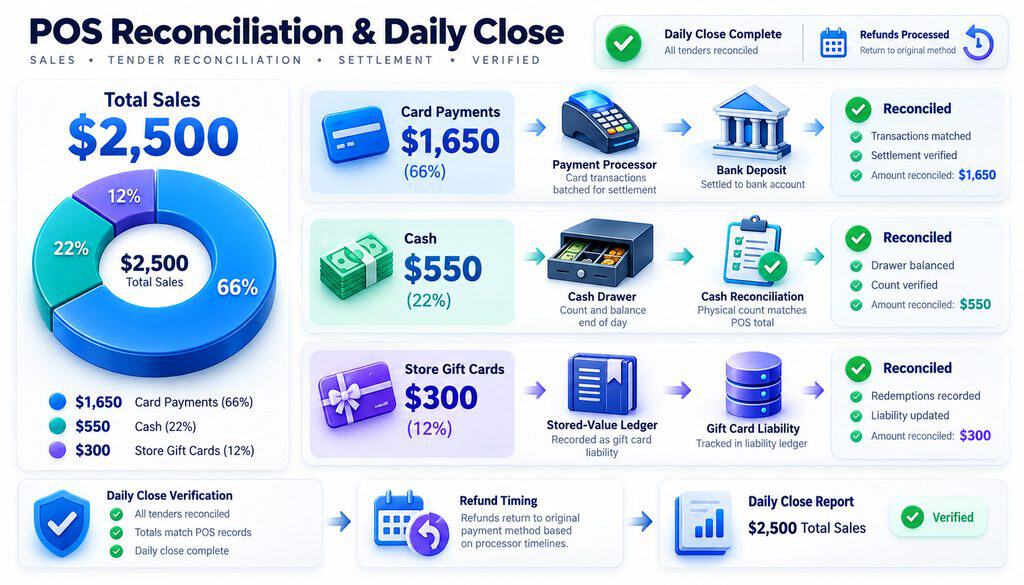
Assume a business records $2,500 in completed sales.
| Tender category | Amount |
| Credit and debit cards | $1,650 |
| Cash | $550 |
| Store gift card redemptions | $300 |
| Total sales | $2,500 |
The $1,650 card figure should be reconciled with card-processing records for the relevant transactions.
The $550 cash contribution belongs in cash reconciliation, while the $300 store gift card redemptions should match stored-value reporting.
Managers should also review refunds, settlement timing, and fees before comparing processor deposits with card totals.
The purpose is to explain differences, not automatically classify every unmatched amount as a loss.
Frequently Asked Questions
Can a POS accept cash and credit card payments on the same purchase?
Yes. A POS that supports split tender can collect part of the total in cash and charge the remaining amount to a credit card. Both tenders remain linked to one sale.
Can customers use three payment methods on one transaction?
Many POS systems allow cash, cards, and store gift cards to be combined in one purchase. The number and type of supported tenders depend on the POS and integrations.
Can a customer use a gift card and credit card together?
Yes, if the system supports those payment types. For a merchant-issued gift card, the POS can apply the available gift card value and request the remaining amount through a credit card.
What happens when a prepaid card has insufficient funds?
Where partial authorization is available, the issuer may approve an amount below the requested total. The customer can then pay the outstanding balance using another accepted payment method.
Which payment method gets refunded first on a split-tender sale?
There is no universal first-tender rule. The merchant must follow the applicable payment-network requirements, processor rules, return policy, and supported POS refund workflow.
Can a customer receive cash back for a credit card purchase?
Merchants should not routinely replace a linked credit card refund with cash. Eligible card refunds generally need to return through the original card account, subject to applicable exceptions.
Why does a POS sales report not match the card batch?
The sales report includes all recognized sales, while the card-processing report contains card-funded transactions. Cash, merchant-issued gift card redemptions, refunds, processing fees, and settlement timing can explain differences.
Can a split-tender transaction be partially refunded?
Yes, if the POS supports it. The system should identify the returned amount and issue refunds through permitted original payment methods without exceeding the customer’s eligible refund.
Does split tender work with deposits and layaway?
Some POS systems support deposit and layaway payments, but these functions are not automatically included in basic split tender. Transactions collected over time generally need appropriate order tracking.
Does every credit card terminal support split tender?
No. Compatibility depends on the POS software, terminal, payment gateway, processor, and integrated features. Merchants should verify mixed payments, partial authorizations, and refund behavior before relying on the setup.
Conclusion
A successful split tender POS setup should make checkout flexible without complicating accounting. Customers should be able to combine approved payment methods on one purchase, while merchants retain complete records of every payment.
The most effective configuration supports accurate remaining-balance prompts, partial authorization where available, controlled refunds, and separate reporting for cards, cash, and merchant-issued gift cards.
Before introducing the workflow, test common payment combinations, train cashiers on canceled or interrupted transactions, and confirm that end-of-day reports reconcile correctly.
When those controls work together, split payments become a convenient checkout feature rather than a source of refund errors, cash discrepancies, and settlement confusion.