By Joseph Reed October 9, 2026
POS system data migration requires exporting customer records, inventory, gift card balances, product catalogs, and open orders before disconnecting the old system. To switch POS systems without losing data, verify supported export formats, reconcile financial liabilities, test imports, complete a final inventory count, and maintain access to historical transactions until every critical record is accounted for.
Changing point-of-sale systems should make running your business easier. But the transition can quickly become a problem when thousands of products, customer profiles, unused gift card balances, and partially fulfilled orders are locked inside the old platform.
The biggest risk is not necessarily losing a spreadsheet. It is transferring information without preserving what that information means.
A gift card with a $75 balance represents an outstanding obligation. An inventory record showing 20 available units may ignore five products already reserved for customers. An open order may have a deposit attached that the new system cannot recognize.
A successful POS system data migration must preserve these relationships, not merely transfer names and numbers.
This guide explains what to export, which records require special handling, how to reconcile gift card liabilities, when to schedule the final cutover, and how to protect the business from data gaps after the new POS goes live.
POS System Data Migration Checklist: What Must Transfer Before Switching?
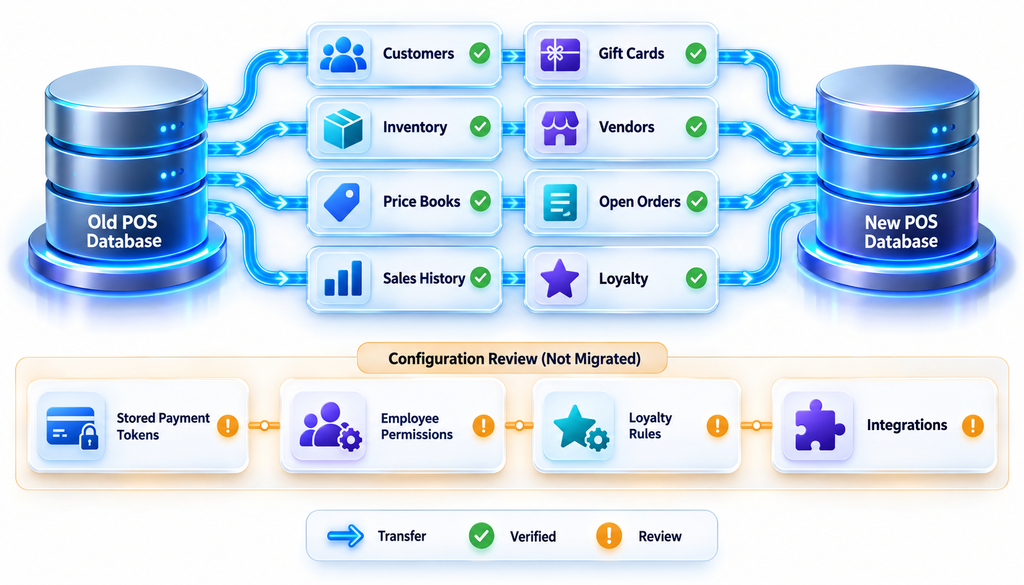
Before selecting a migration date, create an inventory of every type of information stored in the current POS.
The essential records usually extend beyond products and customers. A business may also depend on supplier information, purchase orders, customer credits, discount configurations, employee permissions, and transaction history.
Use the following table to identify what needs to move and what requires additional verification.
| Data category | What must be preserved | Migration priority |
| Customer records | Names, contact details, IDs, permitted preferences | High |
| Product catalog | SKUs, barcodes, variants, tax categories, descriptions | High |
| Inventory | On-hand, reserved and available quantities by location | Critical |
| Gift cards | Outstanding balances, identifiers and redemption records | Critical |
| Open orders | Order status, deposits, remaining balances, fulfillment details | Critical |
| Vendors | Supplier names, product associations and purchasing details | Medium |
| Price books | Retail prices, location-specific prices and customer pricing | High |
| Historical sales | Receipts, payments, refunds and tax information | High |
| Loyalty records | Points, rewards and customer eligibility | High if active |
| Stored card credentials | Provider-controlled payment tokens and billing relationships | Special handling |
| Employee settings | Roles, permissions, commissions and operating rules | Reconfigure |
| Reporting configuration | Tax mapping, accounting categories and report definitions | Rebuild or verify |
The priorities reflect operational risk, not universal vendor requirements. A business without gift cards can eliminate that category, while a restaurant with hundreds of outstanding deposits may place open orders at the top of its list.
Separate Transferable Data From Configuration
One of the first decisions is distinguishing records that can be imported from settings that must be recreated.
Customer names, product descriptions, and SKUs can often move through CSV files. Payment credentials, device-specific configurations, and some loyalty program rules may require a different approach.
Shopify’s official POS launch checklist demonstrates this distinction. Its documented migration sequence places products before customers, historical orders, and gift cards to preserve important record relationships.
That sequence is specific to Shopify’s documented workflow. Other POS platforms may use different import dependencies.
The practical lesson is to obtain the destination system’s required import order before building your migration schedule.
What Data Can You Export From Your Old POS System?
Not every POS provider offers the same export capabilities.
Some platforms provide direct downloads from the administration dashboard. Others require an API connection, migration application, support request, or paid professional service.
Certain records may be available only through reports rather than a structured import-ready file.
Before signing a new contract or canceling the old service, ask both providers which data can actually be transferred.
Common POS Export Formats
| Format | Typical use | Limitations |
| CSV | Customers, products, inventory and price lists | May not preserve complex relationships |
| XLSX | Data review, mapping and reconciliation | Must match destination import rules |
| JSON | Detailed structured data and API exports | Requires technical mapping |
| XML | Structured catalog or transaction records | Import support varies |
| API | Automated or custom migration | Access, rate limits and permissions vary |
| Historical reports, receipts and audit evidence | Usually unsuitable for bulk importing |
CSV is particularly useful because many POS systems support spreadsheet-based product and customer imports.
However, a CSV export should not automatically be treated as complete.
For example, a customer file may contain names and emails but omit loyalty balances, purchase history, tax-exempt status, or marketing preferences.
Request a Sample Export Before Committing to a Date
Ask the existing provider for a small sample of every critical export.
Then have the new POS vendor confirm that it can import the fields, preserve relationships, and explain any unsupported data.
Your sample should include difficult cases, not just ordinary records:
- A product with multiple size or color variants.
- A customer with several addresses.
- A gift card with a partial remaining balance.
- An open order with a deposit.
- A product available at multiple locations.
- A partially fulfilled order.
- A returned item with a historical receipt.
A migration test that succeeds with 10 simple products does not establish that the business can move 10,000 complex product records.
What to Demand From the Old Provider
Before deactivation, obtain written confirmation of the available exports and how long access will continue.
Ask for details covering:
- Data categories included in each export.
- File formats and field definitions.
- Historical transaction coverage.
- Customer and product identifiers.
- Availability of gift card balances and transaction history.
- Open orders, credits and deposit records.
- Export fees, assistance and processing times.
- Access after cancellation.
- Backup and data-deletion procedures.
Also confirm whether the provider limits API usage or requires special permissions.
The objective is to prevent a situation where the old account closes before the merchant discovers that a critical report was never downloaded.
Migrating Customer Records Without Losing Relationships
A POS customer data export is often one of the easiest files to produce and one of the easiest to mishandle.
Customer profiles may look straightforward, but their underlying relationships can be complicated.
A record might be attached to previous orders, gift cards, loyalty points, saved addresses, customer-specific discounts, or outstanding credits.
Moving the contact information alone does not preserve those connections.
Clean the Customer Database Before Importing
Export the customer directory and check for duplicate profiles, incomplete names, invalid contact details, and outdated records.
For example, one customer might appear under three profiles:
- Sarah Mitchell — email address only
- S. Mitchell — phone number only
- Sarah M. — previous purchase history
Combining these records may be appropriate after identity verification, but merging solely because names look similar can mix unrelated customers.
Use stable identifiers and documented matching rules.
Keep the original customer ID in a separate migration-reference column even if the new system generates a different identifier.
A typical customer mapping file may contain:
| Old customer ID | New customer ID | Migration status | |
| C-1001 | N-501 | [email protected] | Verified |
| C-1002 | N-502 | [email protected] | Verified |
| C-1003 | — | [email protected] | Review required |
Illustrative mapping records; all identifiers and addresses are fictional.
This mapping allows open orders and transaction records to be connected to the appropriate customer after import.
Do Not Assume Marketing Consent Transfers Automatically
A customer agreeing to receive receipts is not necessarily consenting to promotional emails or text messages.
Preserve available consent records, sources, dates, and opt-out indicators. Confirm how the destination system represents those choices.
Do not convert missing consent information into affirmative permission during migration.
Similarly, restrict access to customer exports. Files containing personal information should be transferred through approved secure channels, retained only as necessary, and deleted according to the business’s documented retention procedures.
Verify More Than the Customer Count
Importing 8,000 profiles successfully does not necessarily mean that 8,000 usable customer records arrived.
Review whether the new POS correctly retained contact information, customer identifiers, linked addresses, tax-exemption indicators where applicable, and permitted marketing preferences.
Spot-check records across different customer categories.
When practical, compare both the total record count and a field-level summary, including missing values and duplicates.
Gift Card Balance Migration: How to Protect Outstanding Liabilities
Gift card migration deserves special attention because the merchant still owes customers the unredeemed value.
If a business has $18,000 in outstanding gift card balances, those obligations do not disappear simply because the business changes POS providers.
A failed transfer can result in customers presenting valid cards that the new register does not recognize.
The safest approach is to reconcile the liability, identify the supported transfer method, and prevent untracked redemptions during the final changeover.
Reconcile the Gift Card Liability Before Exporting
Obtain an active gift card balance report from the existing provider.
At minimum, it should identify the account or card reference, remaining balance, status, and the relevant reporting timestamp. Where available, preserve activation, redemption, adjustment, and expiration-related records.
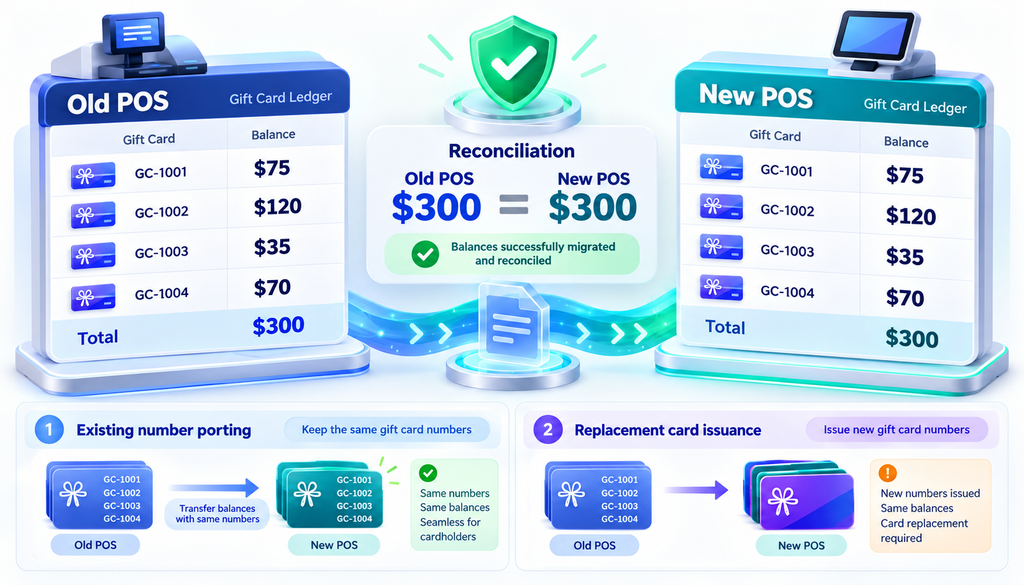
Consider this hypothetical gift card ledger:
| Gift card account | Remaining balance |
| GC-1001 | $75 |
| GC-1002 | $120 |
| GC-1003 | $35 |
| GC-1004 | $70 |
| Outstanding balance | $300 |
The corresponding gift card balance total in the new system should be $300 after a complete, authorized transfer.
The reconciliation should also account for adjustments occurring between the original report and the actual cutover.
Gift Card Number Porting vs. Reissuing Cards
There are two main approaches, although availability depends entirely on the source and destination gift card programs.
| Method | How it works | Main consideration |
| Number porting | Existing card identifiers continue working | Requires technical compatibility and vendor support |
| Card reissuance | New cards or digital accounts receive transferred balances | Requires customer identification and balance controls |
Number porting is convenient for customers because existing physical cards may continue working. However, card numbers, encryption methods, identifier formats, and gift card provider restrictions can prevent direct reuse.
Card reissuance creates new gift card accounts or identifiers in the destination program. It may require customer communication, replacement cards, and procedures for customers who possess physical cards but have no customer profile.
A merchant should not promise customers that existing gift cards will continue working until the new provider verifies that capability.
Why the Final Gift Card Export Must Happen Near Go-Live
Suppose the merchant exports gift card balances on Monday.
A customer then redeems $30 from a $100 gift card on Tuesday.
If the new system imports Monday’s $100 balance and starts accepting the card on Wednesday, the customer could potentially receive access to $30 that has already been spent.
This is a classic migration reconciliation problem.
A safer sequence is:
- Perform an early sample migration.
- Validate gift card identifiers and balance handling.
- Select a controlled final redemption cutoff.
- Complete or reconcile outstanding redemption activity.
- Generate the final authoritative balance snapshot.
- Import or activate balances in the new gift card system.
- Confirm opening balances and card usability.
- Disable the old redemption pathway before allowing new redemptions.
The merchant should also maintain a documented process for disputed balances and cards that fail validation.
Shopify’s official POS launch documentation specifically warns that gift card activity after importing balances can create incorrect values, which is why the final gift card migration should occur close to launch.
What If Gift Card Numbers Cannot Be Exported?
Some systems conceal complete gift card numbers or prevent reuse of existing identifiers.
Ask whether the provider can supply a secure program-level transfer, supported export, or customer-account mapping.
If neither provider supports direct migration, a controlled reissuance program may be necessary.
Do not build an informal spreadsheet of gift card numbers with unrestricted employee access. Treat the records as sensitive financial-account information and use secure transfer and access controls.
Reconcile the Accounting Liability, Not Just the Card Count
A migration can import the correct number of gift cards and still transfer the wrong financial value.
Suppose 500 gift cards exist, but the original outstanding balance totals $18,000.
If the new platform shows 500 active cards totaling $18,450, the import is not financially reconciled.
Investigate the $450 difference before accepting the new ledger.
Accounting teams should separately assess any applicable gift card breakage, expiration, escheatment, and revenue-recognition requirements. Rules vary by jurisdiction and circumstances.
The migration itself should not silently eliminate customer obligations or create an unsupported accounting adjustment.
Inventory Migration POS: Moving Products, Quantities, and Price Books
Inventory migration is more than transferring a list of products.
A POS can contain several quantities for the same item: stock physically present, stock reserved for orders, units awaiting receipt, and quantities available for sale.
Importing the wrong number can immediately create overselling, inaccurate purchasing decisions, or discrepancies between the warehouse and storefront.
Start With a Clean Product Catalog
Before moving inventory, review the product master file.
Important fields include:
- Unique product ID or SKU
- Product description and category
- Barcode or UPC
- Variants such as size and color
- Unit of measure
- Cost and selling price
- Applicable tax classification
- Supplier or vendor association
- Active or discontinued status
- Location-specific availability
Do not generate new SKUs casually.
If the business already uses barcodes on products, shelves, purchase orders, and warehouse systems, changing identifiers can break those relationships.
Create a mapping between old and new product IDs whenever the destination system requires different identifiers.
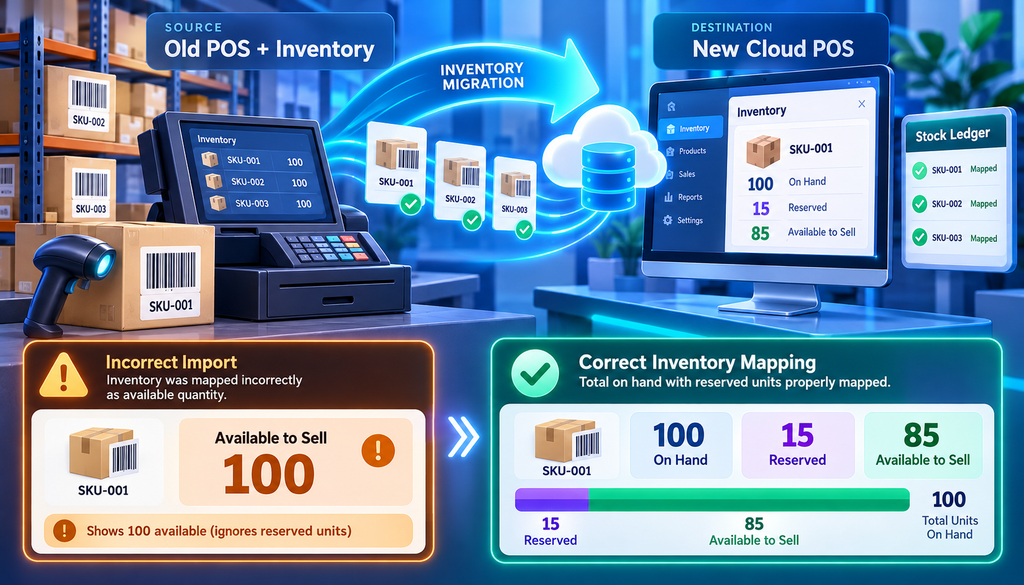
Understand On-Hand vs. Available Inventory
Consider a retailer that has 100 units of a product physically in stock, with 15 reserved for customer orders.
| Inventory measure | Quantity |
| Physical units on hand | 100 |
| Units reserved for orders | 15 |
| Available to sell | 85 |
If the new POS imports 100 as available inventory while also recreating the 15 reserved units without reducing availability, it could permit sales of stock already promised to customers.
The migration must preserve the meaning of each quantity.
Confirm whether the destination tracks on-hand, committed, available, incoming, or other inventory states, and map the source values accordingly.
Perform a Final Physical Inventory Count
A physical count close to the final cutover provides a reliable comparison against the system’s expected inventory.
For larger businesses, a complete wall-to-wall count may not always be practical. A controlled combination of cycle counts, targeted recounts, and inventory movement reconciliation may be necessary.
The important consideration is preventing inventory changes from falling between the final snapshot and go-live.
A recommended sequence is:
- Clean duplicate and discontinued SKUs.
- Import the product catalog into the test environment.
- Confirm product IDs, barcodes, variants, and prices.
- Record inventory movement since the initial export.
- Count or reconcile stock at the planned cutoff.
- Complete the final inventory quantity import.
- Verify counts at each location.
- Release the new POS for live transactions.
Shopify’s official inventory CSV import and export documentation describes how inventory files identify product variants and locations. It also documents validation designed to prevent certain stale imports from unexpectedly overwriting inventory quantities.
This illustrates why an inventory migration must follow the destination system’s actual import rules, not just the format of the old spreadsheet.
Do Not Forget Vendors and Price Books
Inventory data often depends on supplier and pricing information.
For each product, verify that vendor relationships, purchase costs, wholesale prices, quantity discounts, and customer-specific price lists remain usable.
A store may successfully import 2,000 SKUs but discover that every item now has the same default price or incorrect tax category.
Check promotional pricing and scheduled discounts separately. Some price rules are stored as POS configurations rather than ordinary product fields.
Likewise, vendor records may move successfully while their product associations or outstanding purchase orders require rebuilding.
Open Orders, Deposits, and Unfulfilled Sales: The Records You Cannot Ignore
Open orders are among the highest-risk records in a POS migration because they represent ongoing commitments to customers.
A closed historical sale is primarily a recordkeeping concern. An open order still requires operational action.
It may involve products reserved for pickup, a deposit already collected, a remaining balance, or an outstanding refund.
Before cutover, obtain an open-orders report that identifies every unfinished transaction.
Classify Open Orders by Status
| Order category | Migration requirement |
| Paid, awaiting pickup | Preserve order and pickup status |
| Partially paid | Preserve deposit and remaining balance |
| Partially fulfilled | Preserve delivered and undelivered items |
| Layaway | Preserve payment history and reserved goods |
| Preorder | Preserve expected fulfillment details |
| Refund pending | Preserve customer obligation and payment reference |
| Purchase order | Preserve receiving and supplier commitments |
An open order should not be imported as fully paid or fulfilled simply to make the file pass validation.
Example: Moving a Partially Paid Order
A customer places a $900 order for custom furniture and pays a $300 deposit.
The remaining $600 will be collected when the furniture arrives.
The migration must preserve:
- Original order number
- Customer identity
- Items ordered
- $900 order value
- $300 deposit paid
- $600 outstanding balance
- Payment reference for the deposit
- Expected delivery or pickup status
If the new POS imports only the $900 order without recognizing the $300 payment, staff might accidentally request the full amount again.
If it imports the order as fully paid, the merchant could fail to collect the remaining $600.
This is why every open-order migration needs both financial and fulfillment checks.
What If Open Orders Cannot Be Imported?
Not every platform supports importing partially fulfilled or partially paid orders.
In that situation, the merchant may need a controlled transition ledger.
Each outstanding order should have an owner, verified amount, remaining obligation, status, and documented handling procedure.
The business can then choose an appropriate supported workflow, such as recreating an open order in the new POS or completing selected legacy orders in the old system.
Avoid forcing unsupported historical payment data into new transactions.
A recreated order should not trigger a second card charge, distort sales reporting, or create duplicate revenue.
What Usually Does Not Transfer When You Switch POS Systems?
Some information is difficult to migrate because it belongs to a specific payment processor, integration, or proprietary platform.
Before finalizing a POS system data migration, identify the records and features that will need a workaround.
| Data or feature | Transfer outlook | Practical workaround |
| Basic customer contacts | Commonly supported | CSV or API import |
| Product and SKU records | Commonly supported | Catalog import and mapping |
| Historical sales | Varies | Order import or searchable archive |
| Stored payment tokens | Not automatically portable | Approved processor-to-processor migration |
| Loyalty program rules | Often require rebuilding | Recreate earning and redemption rules |
| Loyalty balances | Depends on program | Verified balance import or credit conversion |
| Employee permissions | Often need reconfiguration | Build roles in new POS |
| Custom reports | Often platform-specific | Rebuild from source reporting requirements |
| Third-party integrations | May require reconnection | Reauthorize and test individually |
| Hardware configurations | Often device-dependent | Reconfigure compatible devices |
Stored Card Tokens Need Special Handling
A customer record containing a name and email address is fundamentally different from a customer record connected to a stored payment credential.
Saved card tokens are often specific to the vault, processor, or payment environment that created them.
They should not be assumed portable simply because the old POS offers customer CSV exports.
However, stored card migration is not universally impossible.
Some processors offer controlled migrations that transfer eligible card-on-file data through secure processor-to-processor procedures.
For example, Square documents an eligible one-time migration process using an encrypted file supplied by the previous compliant processor. Its current documentation also clarifies that this process does not transfer gift cards, subscriptions, or appointment records.
Before relying on saved-payment continuity, ask whether the two payment providers support an approved migration, how customer records will be mapped, and whether customers need to re-enter their payment information or provide any required new authorization.
Never export raw payment card data to an ordinary spreadsheet or send it through email to facilitate the migration.
Recurring Billing and Card-on-File Payments
Businesses using subscriptions, memberships, stored credentials, or installment billing must give these programs separate attention.
A successful customer import does not establish that the new processor can charge the customer’s saved payment method.
Document all active recurring agreements, billing dates, amounts, token references, and required customer authorization records.
Coordinate the transition with the payment providers before disabling the old billing environment.
If credentials cannot be migrated through an approved method, arrange for customers to update their payment details securely.
The goal is to avoid missed payments, duplicate charges, and unsupported attempts to reuse payment credentials.
Loyalty Programs May Need Rebuilding
Loyalty points are not always equivalent between POS platforms.
An old program may award one point per dollar, while a new program uses visits, spending tiers, or category-based rewards.
Even if the point balances can be imported, the earning and redemption rules may not transfer.
Before launch, document outstanding rewards, customer balances, expiration policies, and the conversion approach.
Customers should not lose previously earned benefits simply because the new system uses a different loyalty structure, unless a lawful and properly disclosed program change permits that result.
How to Sequence the POS Cutover Without Interrupting Sales
The safest migration is planned around the business’s operating calendar, not merely the date when new terminals arrive.
Choose a slower trading period when staff and technical support are available.
For many retailers, an evening after closing or a traditionally quiet weekday can be appropriate. Restaurants may prefer a controlled period between service days.
The exact timing should reflect inventory complexity, order volume, gift card activity, and the availability of both POS vendors.
Phase 1: Preparation and Mapping
Document the current system and test the future setup.
Key tasks include:
- Complete the data inventory.
- Obtain sample exports.
- Confirm destination import formats.
- Identify unsupported records.
- Reconcile initial gift card liabilities.
- Clean customer and product records.
- Map source IDs to destination IDs.
- Configure taxes, tenders, roles, and locations.
- Test critical hardware and payment integrations.
Assign a responsible person to each workstream.
A single overall project owner should maintain the migration schedule and track unresolved exceptions.
Phase 2: Test Imports and Parallel Validation
Import sample data into the destination environment and compare it with the original records.
Test ordinary products alongside edge cases: multiple variants, inactive SKUs, negative stock adjustments, partially paid orders, and gift cards with unusual balances.
The new system should also be tested with barcode scanners, receipt printers, cash drawers, terminals, and network connections.
A parallel period does not necessarily mean running both systems independently for all live sales.
Doing that without strict controls can duplicate transactions, alter inventory in different places, and create inconsistencies in gift card balances.
Instead, use a controlled parallel validation process. Keep the existing POS as the authoritative live sales system while testing the new platform with approved test transactions, copies of data, and carefully monitored workflows.
Phase 3: Final Cutover Preparation
At this stage, the core configuration should already be approved.
Create a list of changes that happened after the first export, including new customers, inventory movements, gift card redemptions, open orders, and refunds.
This is the delta, or change set, that must be incorporated before the new POS becomes authoritative.
Finalize the cashier training materials and assign technical support coverage.
Do not introduce major product, pricing, or loyalty changes immediately before migration unless they are essential.
Phase 4: Final Data Snapshot and Go-Live
Scheduled low-volume cutover window
The final cutover should follow an approved sequence:
- Stop or tightly control transactions in the legacy POS.
- Complete the old system’s closing and reconciliation procedures.
- Capture final customer, inventory, order, and gift card changes.
- Import the remaining data into the new POS.
- Reconcile critical opening balances.
- Verify card processing and settlement configuration.
- Test a sale, refund, gift card redemption, and order workflow.
- Confirm the go-live decision with the project owner.
- Begin live transactions only after approval.
Some transitions require separate technical cutoffs for inventory, gift cards, online orders, and card processing.
Do not schedule those cutoffs independently without considering their relationships.
Phase 5: First-Week Monitoring
After go-live, managers should review more than whether customers can pay.
Check inventory movements, gift card redemptions, customer lookups, order completion, refunds, and settlement reports every day.
Keep an exception log and assign ownership to each unresolved issue.
Former-system access should remain available for an agreed period when contracts and technical arrangements permit, especially for historical refunds, disputes, and audit records.
Example POS Switch Timeline
| Stage | Suggested timing | Main deliverable |
| Data discovery | Weeks 4–3 | Complete migration inventory |
| Export testing | Weeks 3–2 | Verified field mapping |
| New POS configuration | Weeks 2–1 | Working test environment |
| Staff training | Week 1 | Staff readiness |
| Final reconciliation | Cutover day | Approved opening balances |
| Go-live | Slower operating period | Operational new POS |
| Daily monitoring | First 7 days | Exception and reconciliation logs |
These times are illustrative planning windows, not guaranteed implementation durations.
A complex multi-location migration may require substantially more preparation.
POS Data Migration Validation: How to Prove Nothing Was Lost
Import success messages do not establish that the new records are accurate.
A proper migration audit compares source data, imported data, financial totals, and operational relationships.
Start with record counts, then verify representative transactions and balances.
| Reconciliation test | Source total | Destination total | Required result |
| Active customer records | 4,000 | 4,000 | Match after approved cleanup |
| Active product SKUs | 2,500 | 2,500 | Match |
| Inventory on hand | 12,000 units | 12,000 units | Match by SKU and location |
| Gift card liability | $18,000 | $18,000 | Financially reconciled |
| Open orders | 85 | 85 | Every outstanding obligation accounted for |
| Customer deposits | $24,500 | $24,500 | Outstanding deposit balance reconciled |
Illustrative validation example. Totals represent hypothetical business records.
A matching grand total can still conceal errors. Two products may have opposite inventory differences that cancel each other out, while individual customer gift cards may have incorrect balances despite the overall liability matching.
Use record-level and location-level checks in addition to total comparisons.
Create a Migration Exception Log
Every unresolved discrepancy should be recorded with a category, record identifier, difference, business impact, owner, and resolution status.
For example, if 12 gift cards fail import, the log should identify the affected account references and amounts rather than simply reporting “12 errors.”
If a discrepancy affects a customer’s money, an unfulfilled order, or stock available for sale, resolve it before approving the relevant production workflow.
Define Go-Live and Rollback Criteria
Agree on what must pass before the new POS can operate independently.
Critical checks should include functioning card processing, accurate gift card redemption, reconciled inventory, accessible open orders, correct tax settings, and verified customer payment workflows.
Also establish what happens if a critical test fails.
A rollback is not as simple as restarting the old register after the new POS has processed live sales. The business must prevent duplicate transactions, duplicate gift card redemptions, and conflicting inventory movements.
Once production begins, rollback requires a controlled reconciliation and transfer of new activity, or a documented alternative operating procedure.
The decision should be approved by the project owner, payment provider, and relevant operational stakeholders.
Staff Retraining: The First-Week POS Cheat-Sheet Approach
Even experienced cashiers can make mistakes when familiar POS functions move to different menus.
Training should focus on the tasks employees perform repeatedly, not every advanced feature in the system.
A one-page cheat sheet placed near the register can help reduce checkout delays.
| Common task | What employees must know |
| Start a sale | Search, scan, and select the correct product |
| Take payment | Choose tender and confirm approval |
| Split tender | Enter partial payment and collect the remainder |
| Check inventory | Find availability by location |
| Redeem gift card | Check balance and complete redemption |
| Find customer | Search without creating duplicates |
| Handle returns | Locate original purchase and refund route |
| Resume an order | Find the correct open-order status |
| Request manager help | Know when approval is required |
| Close a shift | Review cash and tender totals |
Use the previous system as a reference when explaining unfamiliar processes.
A cashier who previously pressed a dedicated Refund button may now need to open the order history before selecting an eligible refund action.
Staff should practice these differences before go-live.
Rebuild Employee Permissions Carefully
Do not simply give every employee administrator access to make the transition easier.
The new POS should assign permissions according to responsibilities, especially for refunds, price overrides, no-sale drawer openings, manual gift card adjustments, and inventory corrections.
The same principles used for POS cashier permissions, voids, and no-sale alerts should be reviewed during implementation. A new platform is an opportunity to correct inappropriate legacy access rather than duplicate it.
Restaurants should also test how employee assignments, tips, and shifts appear in payroll exports. Changing POS platforms may affect the data used for POS tip reporting and payroll reconciliation.
Choose a New POS That Makes the Next Migration Easier
A merchant should evaluate data ownership and exit procedures before signing the new POS agreement.
An attractive monthly subscription price means little if the business later discovers that exporting its own operational records requires expensive custom work.
Ask About Data Ownership and Export Rights
Review the new provider’s agreement and obtain answers to these questions:
- Can the merchant export customer, product, inventory, and order data?
- Which fields are included in standard exports?
- Are gift card balances and liability reports available?
- Can transaction history be downloaded in a usable format?
- Does the provider offer API access, and what are its restrictions?
- Are exports available after submitting a cancellation request?
- Are there fees for migration assistance or historical data access?
- What happens to stored payment credentials and recurring billing relationships?
- How are merchant records retained or deleted after termination?
- Will the provider supply documentation explaining export fields?
Data ownership, export rights, and continued access are different contractual questions.
A contract may recognize that merchants own certain business records while still limiting which data can be exported through the software.
Ask for explicit language about export functionality, assistance, fees, and retention periods.
Verify Payment Hardware and Integration Portability
A business may own its terminals but still be unable to reuse them with a different POS or processor.
Compatibility depends on hardware models, software integrations, payment certifications, processor relationships, and device provisioning.
The types of credit card terminals and their capabilities provide useful context when evaluating integrated, countertop, and wireless equipment.
Before purchasing replacement hardware, evaluate the existing equipment using a credit card terminal compatibility and selection checklist.
Also verify barcode scanners, cash drawers, scales, receipt printers, label printers, and any kitchen display systems.
Check Reporting Portability
Exportable data is most useful when the business can interpret it.
Ask the provider whether financial reports contain original transaction IDs, tax classifications, tender types, refund references, timestamps, and location identifiers.
The new system’s reporting should support the business’s existing accounting and reconciliation procedures.
Where relevant, confirm how POS reporting interacts with payment-processing equipment and merchant transaction settlement records.
A future migration becomes much easier when the merchant preserves a regular, documented export and backup procedure instead of discovering its data limitations only when it wants to leave.
A Real-World POS Migration Example: One Store, Multiple Obligations
Consider a fictional specialty retailer switching to a new cloud POS.
The store has:
- 4,000 customer profiles
- 2,500 active SKUs
- $18,000 in outstanding gift card balances
- 85 open customer orders
- $24,500 in recorded customer deposits
- Two retail locations
The merchant initially exports products and customers. During testing, the team discovers that several products have duplicate SKUs and some customer orders are linked to obsolete product IDs.
The migration team corrects those mapping problems before importing open orders.
The store also learns that the new gift card provider cannot recognize every existing physical gift card identifier. Rather than importing estimated balances, it reconciles the legacy gift card ledger and establishes an approved replacement-card workflow.
Inventory is then counted and reconciled by location immediately before the final cutover. Open orders are reviewed to ensure that existing deposits remain attached to the correct customer obligations.
The business starts selling through the new POS only after completing its critical reconciliation tests.
This example illustrates a central lesson: moving the files is only one part of the job. Preserving financial obligations and operational relationships is what makes the migration successful.
Frequently Asked Questions
Can I switch POS systems without losing customer data?
Yes, provided the old system permits appropriate exports and the new system supports the required imports. Test customer IDs, contact fields, preferences, and linked records before cancellation. Not every customer-related setting or relationship transfers automatically.
What is the best format for a POS customer data export?
CSV is often the easiest format for basic customer imports. More complex relationships may require JSON, an API, or a migration application. Choose the format supported by the destination POS and verify the fields before exporting.
Can I export gift card balances to a new POS?
Sometimes. The ability to export gift card balances to a new POS depends on the existing gift card provider, identifier format, export permissions, and destination capabilities. Card-number porting may be possible, or a balance reissuance process may be necessary. The total outstanding liability must remain reconciled.
What happens to gift cards issued by my old POS?
Existing gift cards remain obligations that need appropriate handling. They may continue working through a compatible integration, receive replacement identifiers, or require a supported alternative redemption process. Do not assume the old card numbers will work automatically.
Will my saved customer credit cards transfer?
Not through an ordinary customer spreadsheet. Stored payment credentials may require a secure, approved provider-to-provider migration. Some processors support this, but compatibility and eligibility vary. If migration is unavailable, customers may need to update their payment details.
How do I migrate inventory without changing stock counts?
Import and verify product identifiers first, then reconcile quantities by SKU and location. Preserve reservations and open-order commitments separately. Perform a controlled final count or inventory movement reconciliation near cutover.
What happens to open orders and deposits?
They must remain traceable and financially accurate. If the new POS cannot import them directly, use a documented transition process that preserves payment history, remaining balances, and fulfillment obligations without charging customers twice.
Should I run both POS systems at the same time?
You can run the old system for live transactions while testing the new system separately. Avoid processing the same live activity independently in both environments unless there is an expressly designed synchronization and reconciliation procedure.
How long should a POS migration take?
A basic, clean data migration may require substantially less time than a complex multi-location transition with gift cards, recurring billing, and outstanding orders. The schedule depends on data volume, provider support, integrations, testing, and staff readiness. Determine the date only after validating representative exports and imports.
What should be on a POS switch checklist?
Include a data inventory, source exports, field mapping, gift card reconciliation, customer records, product and inventory validation, open orders, payment integrations, employee permissions, test transactions, final cutover, rollback procedures, and post-launch monitoring.
Can I still access old sales after canceling the POS?
Only if your provider’s agreement and technical capabilities allow it. Download required reports before termination and negotiate any necessary read-only access. Do not assume historical receipts and payment references will remain available indefinitely.
Conclusion
A successful POS system data migration is not measured by how quickly the new registers begin accepting payments. It is measured by whether the business can continue operating without losing customer relationships, inventory accuracy, gift card value, outstanding orders, or access to essential financial records.
Start with a complete inventory of the old system’s data. Confirm what can be exported, what requires rebuilding, and which financial balances must be reconciled. Test the migration before committing to the final date.
During cutover, control transactions in the old and new systems, complete inventory and gift card reconciliations, and verify that open orders remain accurate.
Finally, train employees, monitor exceptions during the first week, and preserve the historical records needed for refunds, reporting, and audits.
The best way to switch POS systems without losing data is to treat the move as a documented transfer of business records and obligations, not simply a software replacement.